 Claude Sessions Pro
Short answer: Claude has two limits with two resets. The session limit covers a period that starts when you send your first message and resets in full five hours later. The weekly limit resets at a fixed time each week that is assigned to your account. Both reset times are in Settings → Usage, for the account you are signed in to. Claude Sessions Pro shows both resets for every one of your accounts in the menu bar or tray.
Free 1-hour preview. For macOS 14 or later, 64-bit Windows 10 or 11, or Ubuntu 22.04+ and Debian 12+, with the Claude app installed.
The two clocks, and when each resets
- The session limit. The period starts when you send your first message and the limit resets in full five hours later. Send that first message at 9:00 and the session resets at 14:00, whenever you ran out in between.
- The weekly limit. It resets at a fixed time each week that Anthropic assigns to your account. It applies across all models, and some plans have a second weekly limit for one model.
- On Ultra. The Ultra plan has no 5-hour limit, so the weekly limit is the one to watch.
claude.ai, Claude Desktop and Claude Code all count toward the same limits, so a long Claude Code run uses up the session you chat in.
Where to see your reset time
- In Claude Desktop or on claude.ai: click your initials, open Settings, then Usage. The current session and the week are shown with the time until each resets.
- In Claude Code:
during a session, run this to see your plan's limits and how much of each you have used./usage
Both show one account: the one you are signed in to. With a work account and a personal one, checking the other means signing out and in.
What you can do before it resets
- Turn on usage credits. With credits enabled, your work continues on credits when you hit a limit instead of stopping.
- Start the clock early. The session begins with your first message, so a message sent early starts the five hours running before your real work does.
- Move up a plan. Max has five times Pro's usage; Ultra drops the 5-hour limit. Two Pro accounts or one Max?
- See it coming. The reset only surprises you if you weren't watching the meter.
Every account's reset, always on screen.
Claude Sessions Pro shows each Claude account's session and weekly usage, and the time left until each resets, in the menu bar on a Mac and the tray on Windows. It alerts you at 80% and at 95%, so the limit never arrives in the middle of a task.
Each account runs as its own Claude app, so work and personal sit side by side and you never sign out to check the other one. After the free hour it keeps showing one account's usage for free; a $15 one-time license shows every account.
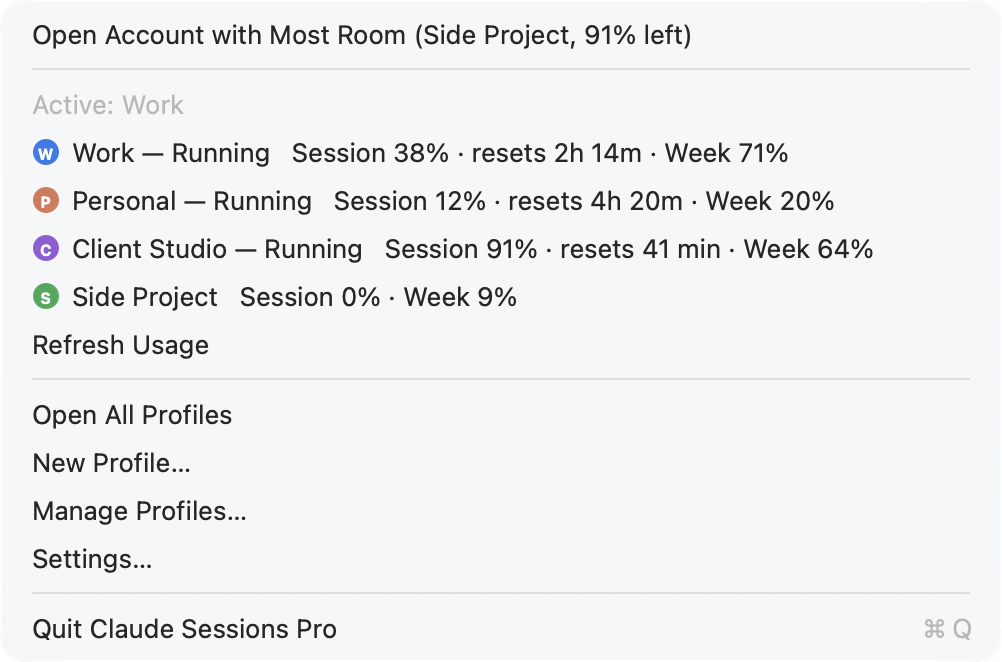
Example accounts. We make Claude Sessions Pro. It shows each account's own usage and doesn't change or pool limits.
 Claude Sessions Pro
Free 1-hour preview · 14-day refund · 2 computers, Mac, PC or Linux
Looking for the tracker itself, and the free options? See a Claude usage tracker for every account.
FAQ
When does the Claude usage limit reset?
The session limit resets in full five hours after the first message of that period. The weekly limit resets at a fixed time each week assigned to your account. Settings → Usage shows both.
Does the Claude 5-hour limit start when I run out?
No. It starts with your first message of the period and resets five hours after that, however early or late you reach the limit.
What time does the Claude weekly limit reset?
At a fixed time each week that is assigned to your account, so it differs from person to person. Settings → Usage shows yours.
Why is my Claude usage limit not resetting?
Check which limit you reached. If the session reset but the weekly limit is used up, Claude stays limited until the weekly reset shown in Settings → Usage.
Can I see the reset time for two Claude accounts at once?
Not in Claude, which shows the account you are signed in to. Claude Sessions Pro shows every account's limits and reset times together.
Claude Sessions Pro is made by LEX GLOBAL IT S.R.L. and is not affiliated with, endorsed by or sponsored by Anthropic. It runs the official Claude app with accounts you already have, and Anthropic's terms apply to each account. Claude is a trademark of Anthropic, PBC.