 Claude Sessions Pro
Short answer: Claude Sessions Pro is a Claude usage tracker for Mac and Windows: it shows each Claude account's session (5-hour) and weekly usage, and when each resets, in your menu bar or tray, and alerts you at 80% and 95%. It also runs every account as its own Claude app, all signed in at once. If you only need a quick look at one account, Claude's Settings → Usage page and /usage in Claude Code are free.
Free 1-hour preview. For macOS 14 or later, or 64-bit Windows 10 or 11, with Claude Desktop installed.
Every account's usage, in your menu bar.
Claude Sessions Pro shows how much of each Claude account's session and weekly limit is used, and when each resets, in the menu bar on a Mac and the tray on Windows. The account in front shows how much it has left right next to its badge, and you get an alert at 80% and 95%, before an account runs out.
It also runs each account as its own Claude app, all signed in at once, so you don't sign out to check another account. Try it free for an hour; after that it keeps showing one account's usage for free, and a $15 one-time license shows every account.
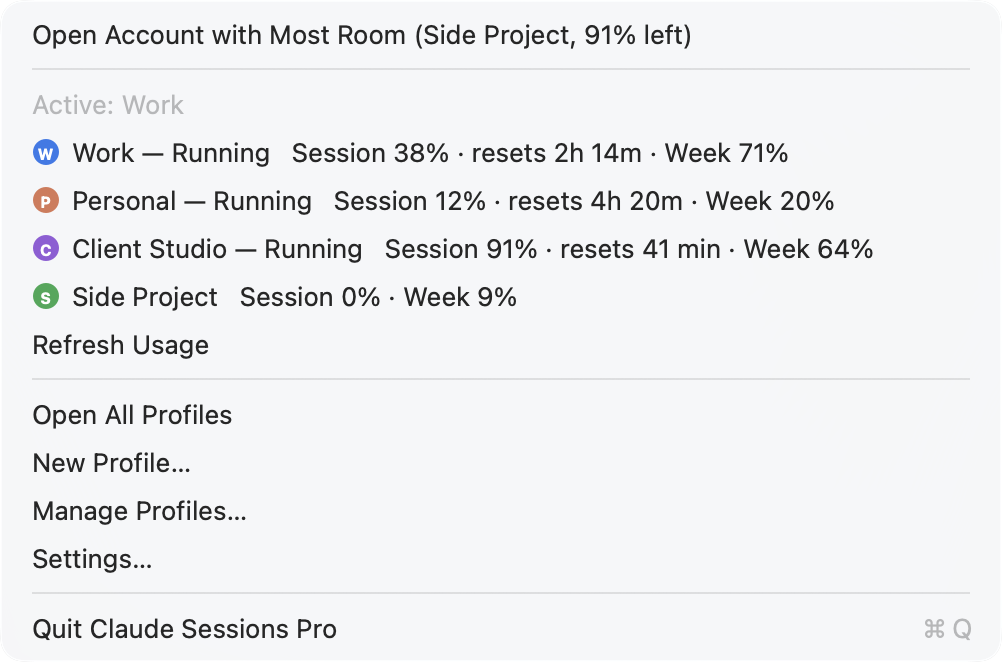
Example accounts. We make Claude Sessions Pro.
How do Claude's usage limits work?
Paid Claude plans have two limits that run side by side. The session limit covers a 5-hour window that starts with the first message you send, and resets 5 hours later. The weekly limit caps your total use over a week, and resets on its own schedule. Some plans also show a separate weekly limit for a particular model.
Anthropic doesn't publish fixed message counts: how fast you use the limit depends on the model, the length of the conversation and the files you add. A long chat with large attachments uses far more than a short question. Your use of claude.ai, Claude Desktop and Claude Code counts toward the same limits.
Where can you see how much is left?
- Claude Desktop and claude.ai. Open Settings → Usage. You'll see the current session and the week as a percentage used, with the time each resets.
- Claude Code. Run
/usagein a Claude Code session to see your plan's limits and how much of each you've used. - The API. If you pay per use through the Claude Console, usage and spending are in the Console, not in your plan limits.
Settings shows the account you're signed in to. If you use more than one Claude account, such as a work account and a personal one, you sign out, or open the other one somewhere else, to check it.
Usage trackers, compared
Settings shows the numbers when you go and look. A tracker keeps them where you can see them while you work. They differ in which part of Claude they watch:
| Watches | Where you see it | Platforms | Cost | |
|---|---|---|---|---|
| Settings → UsageBuilt into Claude | The account you're signed in to | Claude's settings | Mac, Windows, web | Free |
/usageBuilt into Claude Code | Claude Code | The terminal | Mac, Windows, Linux | Free |
| Browser extensionse.g. Claude Usage Meter | claude.ai in that browser | Above the chat box | Chrome, Edge, Firefox | Free* |
| ccusage, Claude Code Usage MonitorOpen-source command-line tools | Claude Code's local logs | The terminal | Mac, Windows, Linux | Free* |
| CodexBarOpen-source menu bar app | Claude and other AI tools | Mac menu bar | Mac | Free* |
| Claude Sessions ProMac and Windows app | Every Claude account you use, side by side | Menu bar / tray | Mac, Windows | One account free; all accounts with a $15 license |
* From each product's own website or repository on 23 October 2026. Command-line tools that read Claude Code's logs estimate tokens and cost from your local sessions; check each one's page for what it shows. We make Claude Sessions Pro.
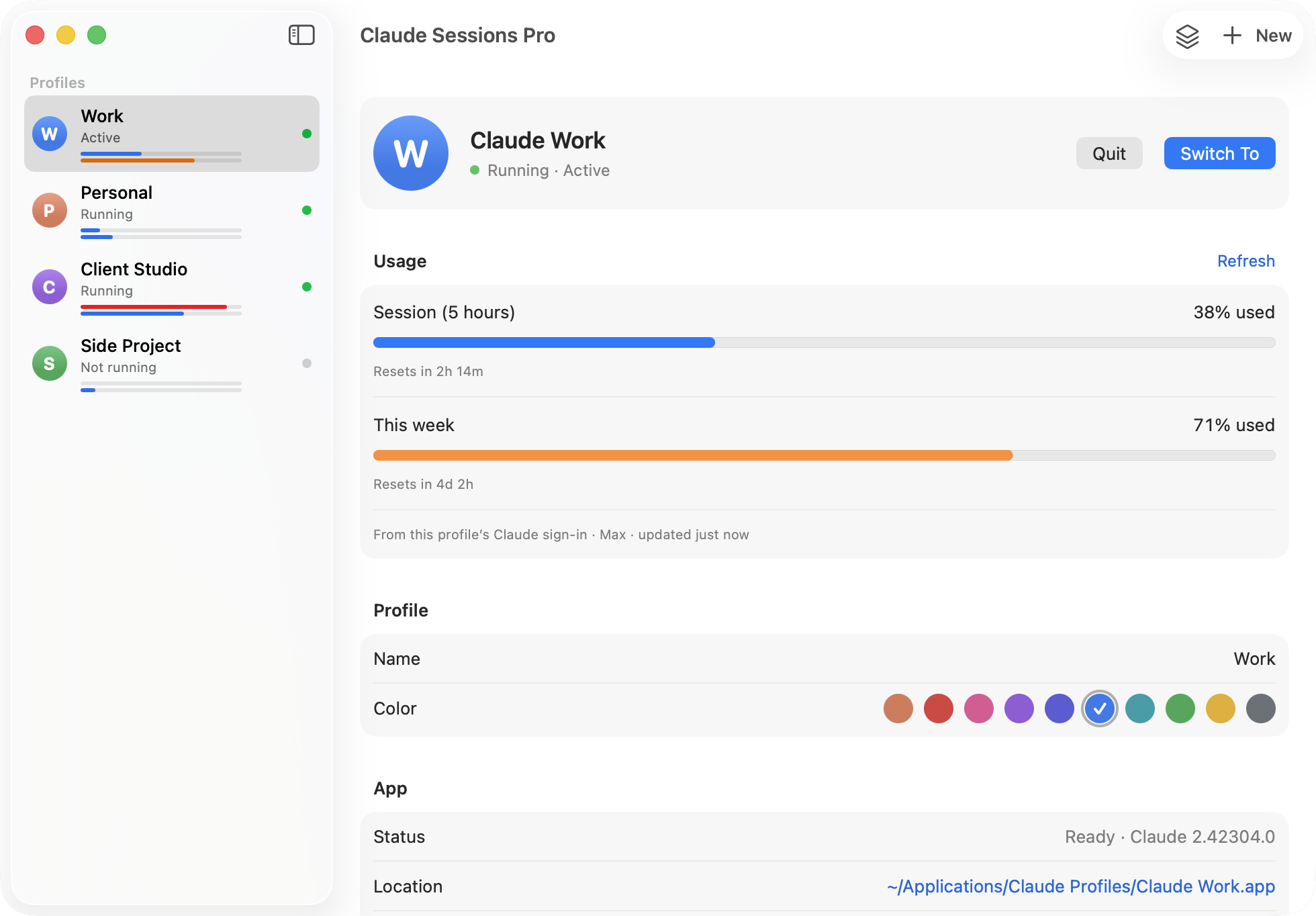
Each account's detail, one click away.
In the Claude Sessions Pro window, every profile shows two thin bars for its session and week, and opening one shows the full numbers with the time left until each reset.
The numbers come from each profile's own Claude sign-in and go only to Claude. They're checked every minute while the menu or window is open, every 5 minutes otherwise. On a Mac, macOS asks once to let Claude Sessions Pro read the profile's sign-in.
Is it allowed to use several Claude accounts?
The usage meter only shows numbers. It doesn't move you between accounts or do anything with them on its own. Claude Sessions Pro runs the official Claude app, signed into accounts you own. Anthropic's terms apply to each account, and making extra accounts to get around usage limits can get them suspended. Read Anthropic's Consumer Terms and Usage Policy, and only use accounts you're allowed to use.
 Claude Sessions Pro
Free 1-hour preview · 14-day refund · 2 computers, Mac or PC
Running several accounts? Every way to run two Claude accounts on a Mac and on Windows. Claude Usage Meter, ccusage, Claude Code Usage Monitor and CodexBar are products of their respective owners.
FAQ
What is the best Claude usage tracker?
It depends where you use Claude. For claude.ai in one browser, a free extension works. For Claude Code alone, open-source command-line tools read its logs. To see every Claude account you use, desktop app and Claude Code included, in your Mac menu bar or Windows tray, Claude Sessions Pro shows each one's session and weekly usage side by side, with alerts at 80% and 95%.
How do I check my Claude usage?
In Claude Desktop or on claude.ai, open Settings → Usage. It shows how much of your current 5-hour session and your weekly limit you've used, and when each resets. In Claude Code, run /usage.
When does the Claude usage limit reset?
The session limit covers 5 hours from your first message in that window, then resets. The weekly limit resets on its own schedule. Settings → Usage shows the time left until each reset.
Does Claude Code use the same limit as claude.ai?
On Claude's paid plans, your use of claude.ai, Claude Desktop and Claude Code counts toward the same limits, so a long Claude Code session leaves less for chat, and the other way round.
Is there a Claude usage tracker for Windows?
Yes. Claude Sessions Pro shows each Claude account's session and weekly usage in the Windows tray, with alerts at 80% and 95%. For Claude Code alone, open-source tools such as Claude Code Usage Monitor run on Windows too.
Can I see the usage of several Claude accounts at once?
Claude's own Settings shows one account, the one you're signed in to. Claude Sessions Pro shows every account you've added as a profile side by side, in the menu bar on a Mac or the tray on Windows.
Is it allowed to use multiple Claude accounts?
Claude Sessions Pro runs the official Claude app, signed into accounts you own, such as your work and personal Claude accounts. It doesn't change how Claude works. Anthropic's terms still apply to each account; using several accounts to get around usage limits may break them, so use it for accounts you're allowed to have.
Claude Sessions Pro is made by LEX GLOBAL IT S.R.L. and is not affiliated with, endorsed by or sponsored by Anthropic. It runs the official Claude app with accounts you already have, and Anthropic's terms apply to each account. Claude is a trademark of Anthropic, PBC.