 Claude Sessions Pro
Short answer: CLAUDE_CONFIG_DIR tells Claude Code which directory to keep its settings, session history and login in. Point it at a second directory and you get a second, separately signed-in Claude Code, as Anthropic's docs describe. When it "doesn't work", the variable usually isn't reaching the command, or another credential is overriding the login. It only affects the terminal: Claude Desktop needs its own separate copy per account, which Claude Sessions Pro sets up along with the variable.
Free 1-hour preview. For macOS 14 or later, 64-bit Windows 10 or 11, or Ubuntu 22.04+ and Debian 12+, with the Claude app installed.
What it separates
- The login. On a Mac the Keychain entry is keyed to the directory, so a different
CLAUDE_CONFIG_DIRreads a different entry. On Linux and Windows the login is the.credentials.jsonfile inside the directory. - Settings and history. Each directory has its own settings and its own session history.
- The default. With the variable unset, Claude Code uses
~/.claude, or%USERPROFILE%\.claudeon Windows.
How to set it
- Bash or Zsh, as an alias.
Add this toalias claude-work='CLAUDE_CONFIG_DIR=~/.claude-work claude'~/.zshrcor~/.bashrc, open a new terminal, and runclaude-work. The first run walks you through login for the new directory. - For one command.
Useful for a quick test.CLAUDE_CONFIG_DIR=~/.claude-work claude - PowerShell on Windows.
This sets it for the current window only.$env:CLAUDE_CONFIG_DIR = "$HOME\.claude-work" claude
Six reasons it's not working
- It is set in one terminal only. A variable set by hand lives in that tab. Open a new one and it is gone. Use the alias, or set it in your shell profile.
- The alias isn't loaded yet.
Aliases added to
~/.zshrcapply to new terminals. Open a new tab or runsource ~/.zshrc. - The tilde is in quotes.
The shell doesn't expand
~inside quotes, so"~/.claude-work"becomes a folder literally named~. Use"$HOME/.claude-work". - Another credential outranks the login.
If/statusANTHROPIC_API_KEY,ANTHROPIC_AUTH_TOKENorCLAUDE_CODE_OAUTH_TOKENis set, Claude Code uses it ahead of the login in your directory. Check which one is active. - You sign in to the Console without an API key. Anthropic's docs say separate directories don't keep two such Console sign-ins apart, because that sign-in is stored outside the configuration directory.
- You expected Claude Desktop to follow. The desktop app doesn't read the variable. It keeps its own login in its own data folder.
The variable, set for you.
Claude Sessions Pro gives every Claude account a profile, and each profile has its own Claude app and its own Claude Code directory. Click "Claude Code in Terminal" on a profile and the CLI opens with that profile's CLAUDE_CONFIG_DIR already set, signed in to the same account as the app. No aliases to write, and no wondering which account a tab is on.
The desktop app is covered too, which the variable alone can't do: each account is its own Claude app on a Mac, or its own window on Windows and Linux, all open at once. Try it free for an hour; then it's $15 once for two computers, Mac, PC or Linux, with a 14-day refund.
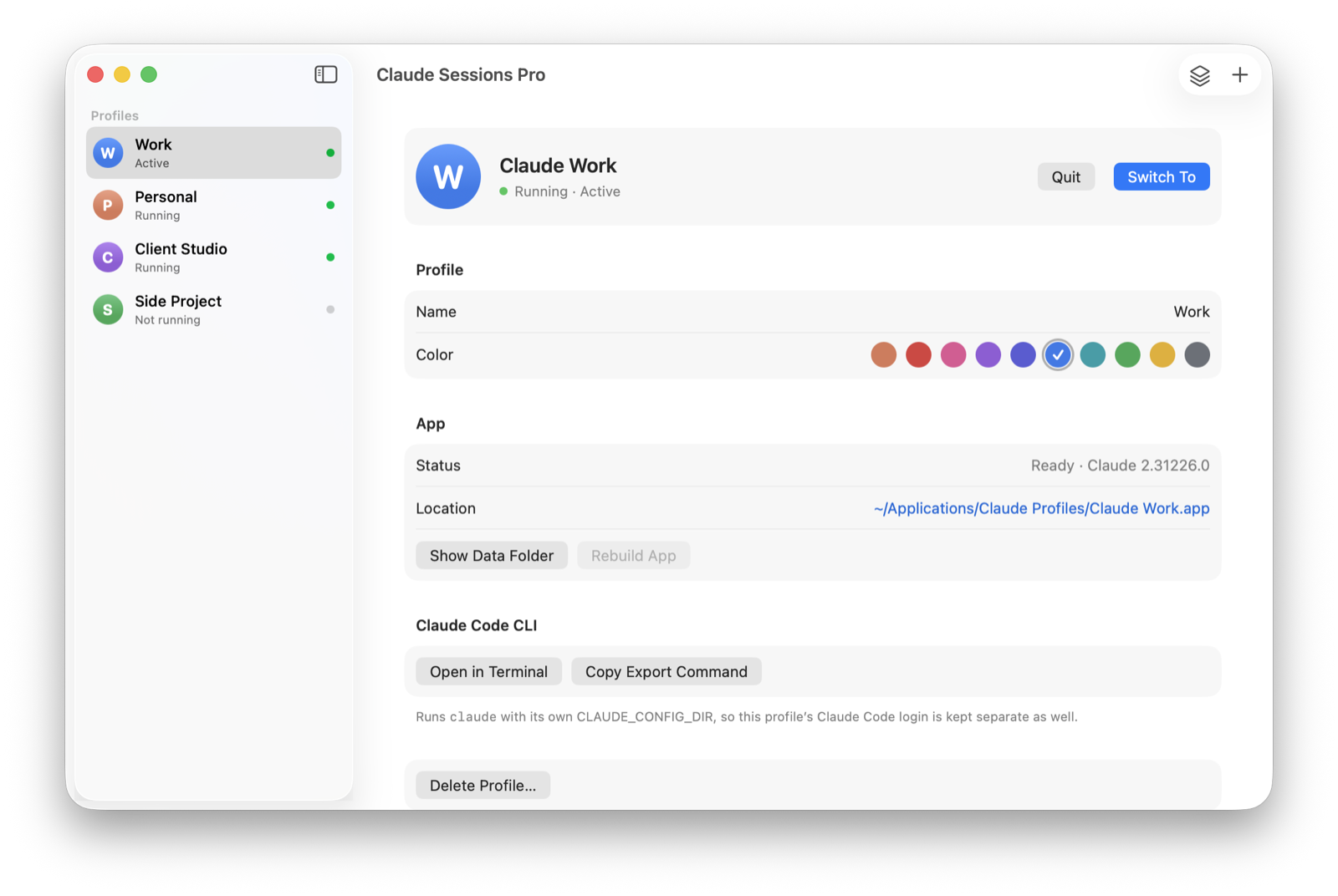
Example accounts. We make Claude Sessions Pro.
 Claude Sessions Pro
Free 1-hour preview · 14-day refund · 2 computers, Mac, PC or Linux
The full two-account setup, with what to copy between folders: two Claude Code accounts in Terminal at once.
FAQ
What is CLAUDE_CONFIG_DIR?
An environment variable that tells Claude Code which directory to use for its settings, session history and login. A different directory is a different, separately signed-in Claude Code.
What is the default Claude config directory?
~/.claude on macOS and Linux, and %USERPROFILE%\.claude on Windows.
Why is CLAUDE_CONFIG_DIR not working?
Usually the variable isn't set in the terminal you are using, the tilde is inside quotes, or an API key or token in your environment is being used ahead of the login. Run /status to see which credential is active.
How do I set CLAUDE_CONFIG_DIR on Windows?
In PowerShell, run $env:CLAUDE_CONFIG_DIR = "$HOME\.claude-work" and then claude. It applies to that window.
Does CLAUDE_CONFIG_DIR work with Claude Desktop?
No. Claude Desktop keeps its own login and doesn't read the variable. Each account needs its own copy of the desktop app, which Claude Sessions Pro sets up.
Claude Sessions Pro is made by LEX GLOBAL IT S.R.L. and is not affiliated with, endorsed by or sponsored by Anthropic. It runs the official Claude app with accounts you already have, and Anthropic's terms apply to each account. Claude is a trademark of Anthropic, PBC.