 Claude Sessions Pro
Short answer: Claude Desktop keeps one login in one data folder, so a second instance only helps if it has a folder of its own. On a Mac you can start one from Terminal with --user-data-dir, but both copies share a Dock icon, Google sign-in often lands in the wrong window, and you start it by hand every time. Claude Sessions Pro runs one instance per account as its own app, each with its own icon, name and login, on Mac, Windows and Linux.
Free 1-hour preview. For macOS 14 or later, 64-bit Windows 10 or 11, or Ubuntu 22.04+ and Debian 12+, with the Claude app installed.
Why opening Claude twice isn't enough
Claude Desktop stores everything for the signed-in account (login, settings, connectors and the list of Claude Code sessions) in a single data folder: ~/Library/Application Support/Claude on a Mac, ~/.config/Claude on Linux. One folder means one login. A second instance that reads the same folder is the same account again, not another one.
So "multiple instances" really means "multiple data folders": one per account, each with its own copy of the app running on it.
A second instance by hand, on a Mac
- Start a second copy with its own folder.
It opens signed out, next to the first one.open -n -a Claude --args --user-data-dir="$HOME/Library/Application Support/Claude-Work" - Sign in with the other account. This is where it gets awkward: Google sign-in comes back through a link, and it often lands in the wrong window.
- Repeat next time. The second copy isn't an app you can click. You run the command from Terminal every time you want it.
- One Dock icon for both. Both copies are "Claude", so the Dock and ⌘-Tab can't tell work from personal.
- Claude Code is separate again. The terminal keeps its own login, so each instance needs a matching
CLAUDE_CONFIG_DIRtoo.
On Linux and Windows
- Linux. A second copy starts with
--user-data-dir, but the sign-in link is handed to your regular Claude, which ignores it, so the second copy never signs in. The Linux guide. - Windows. Claude for Windows keeps one login too. The by-hand routes are the website in a browser profile or a second Windows user, neither of which is a second app on your desktop. The Windows guide.
One instance per account, done properly.
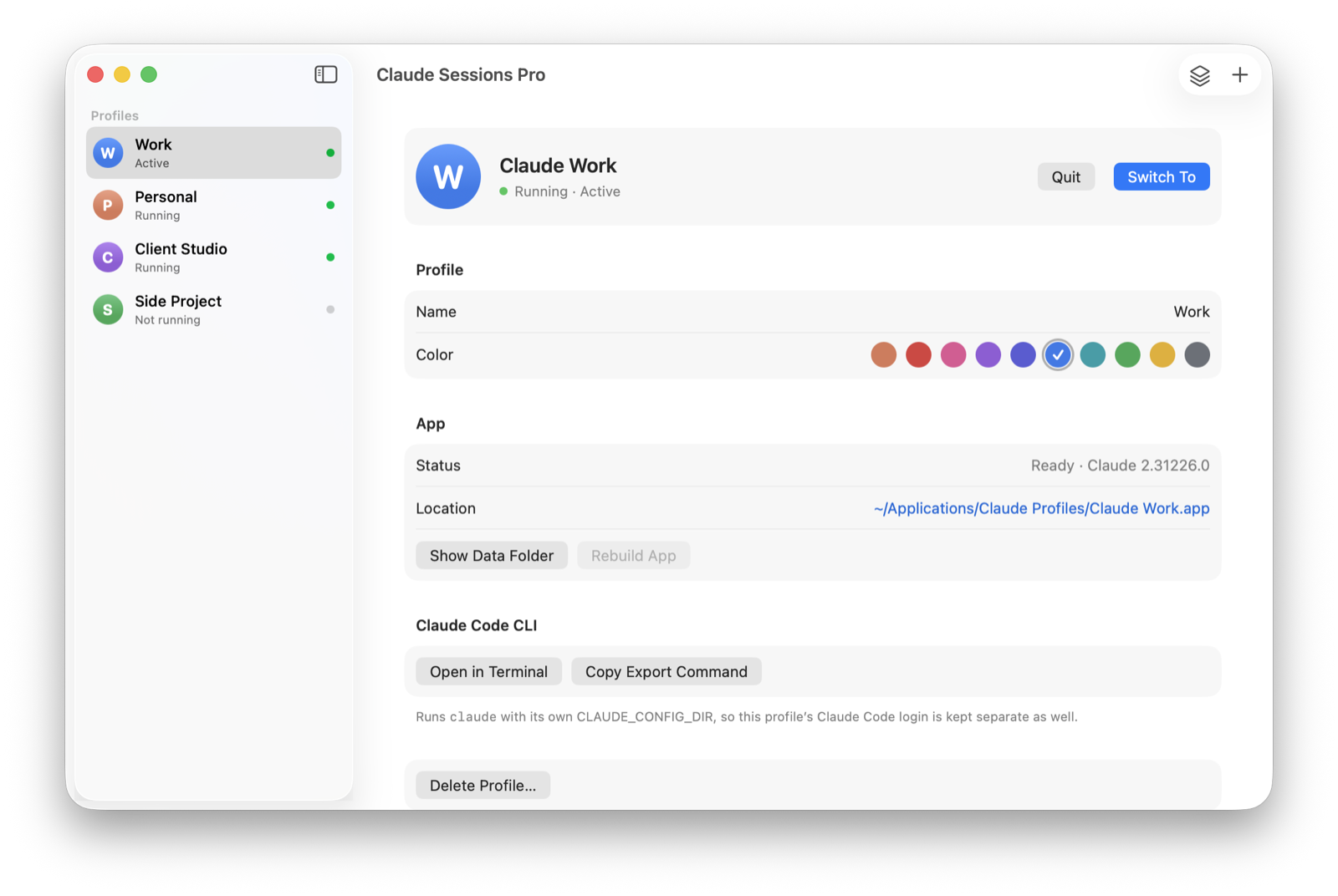
Claude Sessions Pro does what the Terminal command does, and then finishes the job. Each account gets its own instance of the official Claude app with its own data folder, its own name and its own icon: a real app with a colored badge in the Dock on a Mac, its own titled window on Windows and Linux. You open it with a click, and it stays signed in.
Sign-in goes to the right instance. Each one keeps its own chats, Code tab sessions, settings and connectors, and "Claude Code in Terminal" opens the CLI on the same account. Try it free for an hour; then it's $15 once for two computers, Mac, PC or Linux, with a 14-day refund.
| Open Claude twice | Terminal command | Claude Sessions Pro | |
|---|---|---|---|
| A different account per instance | ✕ Same account | ✓ | ✓ |
| Own icon and name | ✕ | ✕ Shared icon | ✓ |
| Sign-in reaches the right window | — | ✕ Often the wrong one | ✓ |
| Starts with a click | ✓ | ✕ Terminal each time | ✓ |
| Windows and Linux | — | Mac only | ✓ |
| Cost | Free | Free | $15 one-time |
Example accounts. We make Claude Sessions Pro.
 Claude Sessions Pro
Free 1-hour preview · 14-day refund · 2 computers, Mac, PC or Linux
Every option on a Mac, compared: how to run multiple Claude accounts on one Mac.
FAQ
Can I run multiple instances of Claude Desktop?
Yes, if each instance has its own data folder. By hand on a Mac that is a Terminal command with --user-data-dir; Claude Sessions Pro sets up one instance per account as its own app.
Why does opening Claude twice show the same account?
Because both read the same data folder, and that folder holds one login. A different account needs a different folder.
Can I have two Claude Desktop windows with different accounts?
Yes. Each account needs its own instance of the app with its own data folder. Claude Sessions Pro opens each account in its own window, named after it.
Does a second instance also separate Claude Code?
No. Claude Code keeps its own login. Each account needs its own CLAUDE_CONFIG_DIR, which Claude Sessions Pro sets when you open Claude Code from a profile.
Is it allowed to use multiple Claude accounts?
Claude Sessions Pro runs the official Claude app, signed into accounts you own, such as your work and personal Claude accounts. It doesn't change how Claude works. Anthropic's terms still apply to each account; using several accounts to get around usage limits may break them, so use it for accounts you're allowed to have.
Claude Sessions Pro is made by LEX GLOBAL IT S.R.L. and is not affiliated with, endorsed by or sponsored by Anthropic. It runs the official Claude app with accounts you already have, and Anthropic's terms apply to each account. Claude is a trademark of Anthropic, PBC.