 Claude Sessions Pro
Short answer: Claude for Linux keeps one login in ~/.config/Claude, so each extra account needs its own data folder. You can start a second copy by hand with --user-data-dir, but Google sign-in comes back to your regular Claude, every copy shares one dock icon, and without the keyring flag the sign-in doesn't last. Claude Sessions Pro for Linux handles all three: each account gets its own Claude window and icon, sign-in returns to the right one, and your regular Claude stays as it is.
Free 1-hour preview. For Ubuntu 22.04+ or Debian 12+, 64-bit Intel/AMD (or ARM64), with Claude for Linux installed.
Where Claude for Linux keeps your login
Anthropic's Claude for Linux (a beta for Ubuntu 22.04 and later and Debian 12 and later) keeps its data in ~/.config/Claude, or under $XDG_CONFIG_HOME if you set it. Your login, settings, connectors and Code tab sessions are in there. One folder, one login: signing in to another account replaces the first.
The free options
- A second browser profile. Sign in to claude.ai with the other account in a Firefox or Chrome profile. Free, but it's the website: no Code tab, local MCP servers or desktop connectors.
- A second Linux user. Each user account gets its own
~/.config/Claudeand~/.claude. Right for two people; for one person it means logging out of your whole desktop to switch. - A second copy by hand. Start
claude-desktop --user-data-dir=~/claude-work. It runs, but see below for what breaks.
What goes wrong with a second copy by hand
Claude for Linux is built on Chromium, so --user-data-dir really does give you a second, separate Claude. Three things get in the way of using it every day:
- Google sign-in lands in the wrong window. Sign-in finishes in your browser and comes back as a
claude://link. Linux hands that link to your regular Claude, which ignores it, so the second copy never signs in. Email sign-in avoids it. - The sign-in doesn't last. Started from a terminal or a script, the copy may not find your keyring and falls back to a plain-text store, so you're signed out after a restart. Adding
--password-store=gnome-libsecretfixes it. - One icon for every account. Every copy is "Claude" with the same dock icon, so on GNOME they group together and you can't tell which window is which account.
Two Claude Code accounts in the terminal
Claude Code keeps its settings, history and login in ~/.claude unless you set CLAUDE_CONFIG_DIR, and Anthropic documents a folder per account for running several at once. On Linux the login is a .credentials.json file inside that folder.
- Create a folder for the second account.
mkdir -p ~/.claude-work - Point Claude Code at it for one command, and sign in.
Claude Code walks you through login for the new folder. Without the variable you're on your first account.CLAUDE_CONFIG_DIR=~/.claude-work claude - Make it one word.
Add an alias toalias claude-work='CLAUDE_CONFIG_DIR=~/.claude-work claude'~/.bashrc(or~/.zshrc):
Don't export CLAUDE_CONFIG_DIR in your shell profile: every terminal inherits it, and you're back to one account.
Each account, its own window.
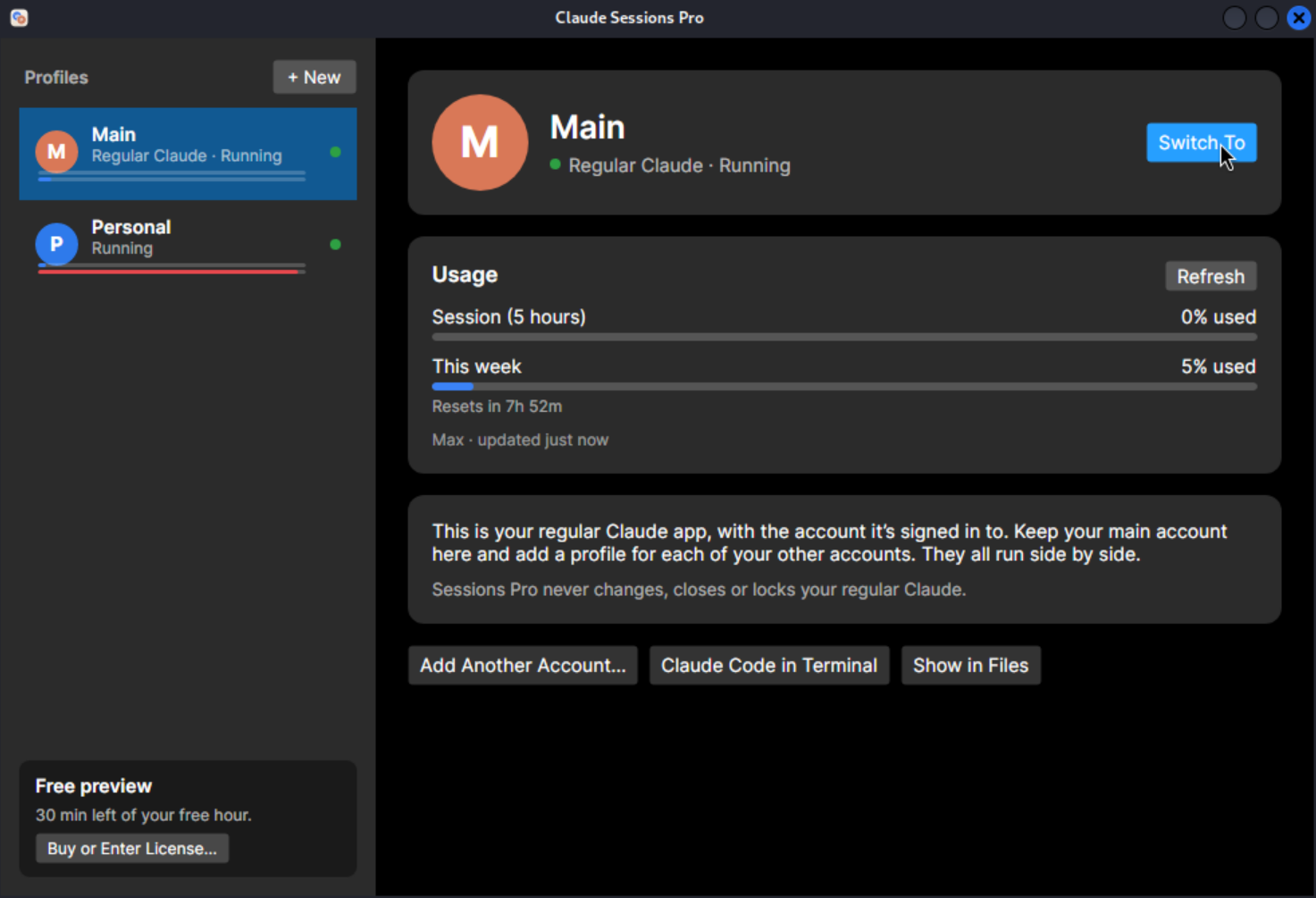
Claude Sessions Pro for Linux runs Anthropic's Claude once per account. Your regular Claude stays as it is, listed as Main; every other account opens in its own Claude window with its own dock icon, name and color, all signed in at once. Every profile keeps its own login, chats, Code tab sessions, pins, settings and connectors, and Cowork with "+ Folder" works in every one.
Google sign-in comes back to the account that started it, sign-ins stay put through your system keyring, and "Claude Code in Terminal" opens the CLI on the same account. It shows each account's usage too. One license covers Mac, Windows and Linux: try it free for an hour, then it's $15 once for two computers, with a 14-day refund.
| Second Linux user | A copy by hand | Claude Sessions Pro | |
|---|---|---|---|
| Claude app per account | ✓ | ✓ | ✓ |
| Both on screen together | ✕ Switch users | ✓ | ✓ |
| Google sign-in to the right account | ✓ | ✕ Lands in the regular Claude | ✓ |
| Own dock icon per account | ✓ | ✕ Grouped as Claude | ✓ |
| Setup | A new Linux user | A launcher you write | Create a profile, sign in |
| Cost | Free | Free | $15 one-time |
We make Claude Sessions Pro.
 Claude Sessions Pro
Free 1-hour preview · 14-day refund · 2 computers, Mac, PC or Linux
On Windows or a Mac instead? See multiple Claude accounts on Windows or on one Mac.
FAQ
Can I run two Claude accounts on Linux at the same time?
Yes, if each account has its own data folder: a second browser profile, a second Linux user, a second Claude started with --user-data-dir, or for Claude Code a separate CLAUDE_CONFIG_DIR. Claude Sessions Pro gives each account its own Claude window and dock icon, all signed in at once.
Where does Claude for Linux store its data?
In ~/.config/Claude (or $XDG_CONFIG_HOME/Claude). Claude Code keeps its own settings and login in ~/.claude unless you set CLAUDE_CONFIG_DIR.
Why doesn't Google sign-in work in a second Claude I started myself?
Google sign-in finishes in your browser and returns as a claude:// link, which Linux gives to your regular Claude, not to the copy that asked. Sign in with email instead, or use Claude Sessions Pro, which sends each sign-in back to the account that started it.
What do I need for Claude Sessions Pro on Linux?
Ubuntu 22.04 or later or Debian 12 or later, 64-bit Intel, AMD or ARM, with Anthropic's Claude for Linux installed. Install the .deb with sudo apt install ./claude-sessions-pro_amd64.deb. One license covers up to 2 computers, Mac, Windows or Linux.
Claude Sessions Pro is made by LEX GLOBAL IT S.R.L. and is not affiliated with, endorsed by or sponsored by Anthropic. It runs the official Claude app with accounts you already have, and Anthropic's terms apply to each account. Claude is a trademark of Anthropic, PBC.