 Claude Sessions Pro
Short answer: it depends on the email. If your work Team account uses the same email as your personal one, Claude's account menu (your initials, lower left) switches between them, one at a time. If they're two different emails, one copy of Claude holds one login, so you sign out and back in. To have both open at the same time, each account needs its own data folder: a second browser profile for claude.ai, a second CLAUDE_CONFIG_DIR for Claude Code, or a second copy of Claude Desktop. Claude Sessions Pro sets up that last one for you: each account becomes its own Claude app on a Mac, or its own window on Windows.
Free 1-hour preview. For macOS 14 or later, 64-bit Windows 10 or 11, or Ubuntu 22.04+ and Debian 12+, with the Claude app installed.
Same email or two emails?
Anthropic's help article on personal and organization accounts says you can have both a personal account and an organization account tied to the same email address. That's common on a Team plan: your company invites your work email, and you had already used it for your own plan.
- Same email. Click your initials or name in the lower left. A blue checkmark shows the account you're using; click the other one to see its own chats and projects. One account at a time.
- Two emails. A company email for work, a Gmail for you. There's no switcher between them: one copy of Claude holds one login, so you sign out and back in.
- Both at once. Neither puts both accounts on screen together. For that, each account needs its own data folder, as below.
On Claude Enterprise, keep your personal account on a personal email. The same article says Enterprise admins can claim existing personal accounts on the company's verified domain. A personal account on your own email stays yours.
Both open at once, for free
- In the browser: open claude.ai in a second browser profile and sign in to the other account there. Chrome, Edge and Safari all have profiles, and both accounts stay signed in. It's the website, though: no desktop app, Code tab or local connectors.
- In Claude Code:
give the work account its own folder, as Anthropic's docs describe. Each folder keeps its own login, somkdir -p ~/.claude-work alias claude-work='CLAUDE_CONFIG_DIR=~/.claude-work claude'claudestays personal andclaude-workis work, in any tab. Full setup. - In Claude Desktop on a Mac:
start a second copy with its own data folder from Terminal and sign in with the other account. It works, with catches: both copies share one Dock icon, Google sign-in often lands in the wrong window, and you start it from Terminal every time. The details.open -n -a Claude --args --user-data-dir="$HOME/Library/Application Support/Claude-Work"
On Windows, Claude Code works the same way in PowerShell; the Windows guide has the commands.
Keep work on the work account
- Plan and usage. Each account has its own plan and limits, so work done on the company seat leaves your own plan's limits for you.
- Chats and projects. Each account keeps its own conversations, projects and files. Nothing moves between them by itself.
- Connectors. Connect your work tools in the work account and your own in yours. Connectors and MCP servers belong to the account and the app you set them up in.
- Check before you start. In Claude Code,
/statusshows the account and organization in use. If/loginlands on the wrong one, check which account your browser is signed in to.
Work and personal, side by side.
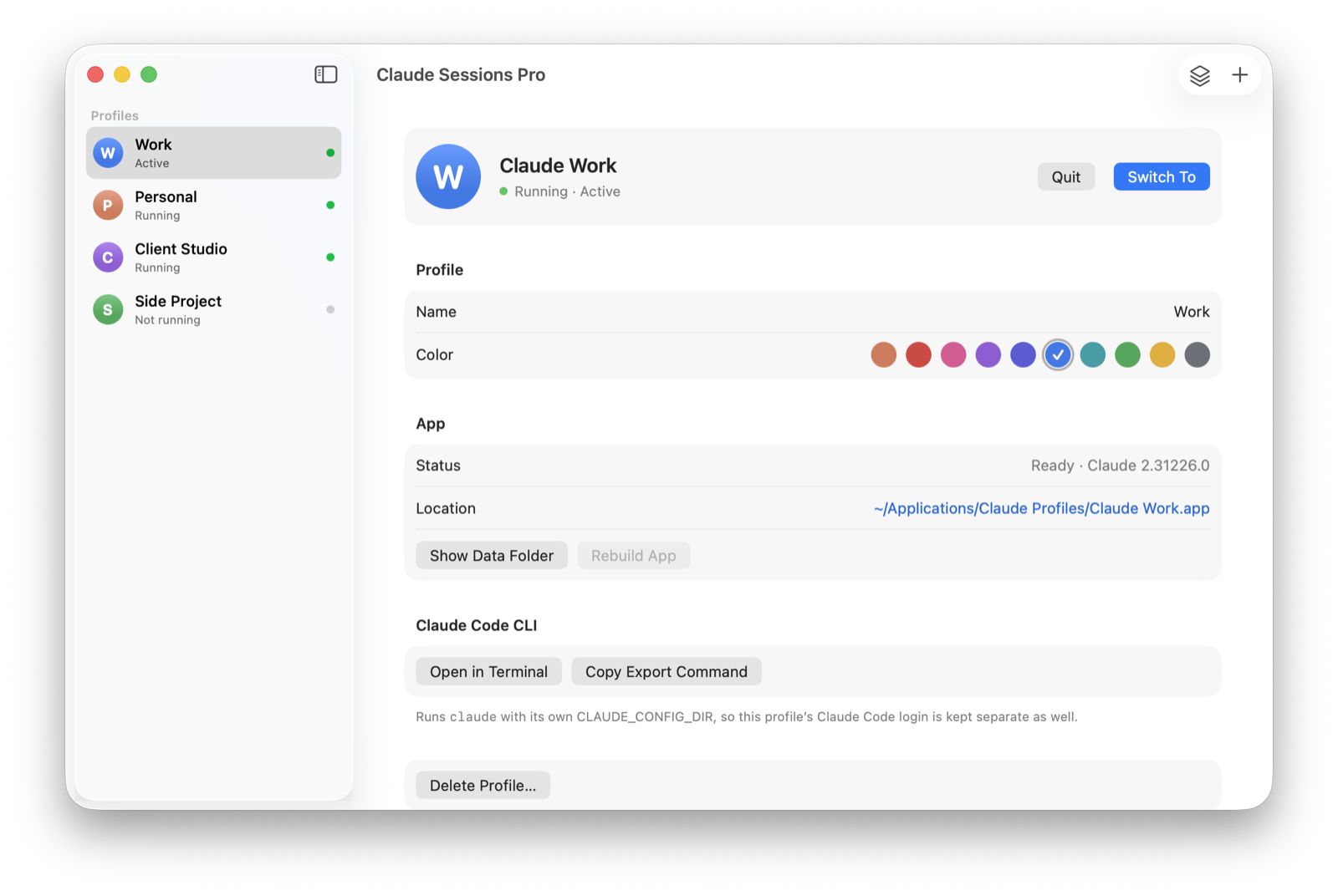
Claude Sessions Pro runs the official Claude app once per account. On a Mac each profile is its own app with its own Dock icon and colored badge, so work and personal are a ⌘-Tab apart; on Windows each opens in its own Claude window, titled with its name. Each profile keeps its own login, chats, Code tab sessions, settings and connectors, and "Claude Code in Terminal" opens the CLI on the same account.
It starts from the Claude you already use, so your current account becomes your first profile with everything in it. Try it free for an hour; then it's $15 once for two computers, Mac or PC, with a 14-day refund.
| Account menu | Browser profile | CLAUDE_CONFIG_DIR | Claude Sessions Pro | |
|---|---|---|---|---|
| Both on screen together | ✕ One at a time | ✓ | ✓ | ✓ |
| Desktop app per account | ✕ | ✕ | ✕ | ✓ |
| Claude Code per account | ✕ | ✕ | ✓ | ✓ |
| Works with two emails | ✕ Same email only | ✓ | ✓ | ✓ |
| Cost | Free | Free | Free | $15 one-time |
We make Claude Sessions Pro.
 Claude Sessions Pro
Free 1-hour preview · 14-day refund · 2 computers, Mac, PC or Linux
Every option with its catches: every way to run two Claude accounts on a Mac, and multiple Claude accounts on Windows.
FAQ
Can I have a work and personal Claude account?
Yes. Many people have their company's Team or Enterprise account and a personal Pro account. They can even share one email address: Anthropic's help pages say a personal account and an organization account can be tied to the same email, and you switch between them from the account menu.
Can I use my work and personal Claude accounts at the same time?
Yes, if each has its own data folder: a second browser profile for claude.ai, a second CLAUDE_CONFIG_DIR for Claude Code, or a second copy of Claude Desktop. Claude Sessions Pro keeps each account open as its own Claude app or window.
How do I switch between my personal and Team account in Claude?
If both use the same email, click your initials or name in the lower left and pick the other account; a blue checkmark shows the one in use. If they use different emails, sign out and sign in with the other one.
Do my personal chats move to my work account?
Not by themselves. Each account keeps its own conversations and projects, and the account menu shows only the one you've picked. When you join a Team or Enterprise organization you may be offered to bring your personal data with you; Anthropic says that move is one-way.
Is it allowed to use multiple Claude accounts?
Claude Sessions Pro runs the official Claude app, signed into accounts you own, such as your work and personal Claude accounts. It doesn't change how Claude works. Anthropic's terms still apply to each account; using several accounts to get around usage limits may break them, so use it for accounts you're allowed to have.
Claude Sessions Pro is made by LEX GLOBAL IT S.R.L. and is not affiliated with, endorsed by or sponsored by Anthropic. It runs the official Claude app with accounts you already have, and Anthropic's terms apply to each account. Claude is a trademark of Anthropic, PBC.