 Claude Sessions Pro
Short answer: Claude keeps one login per data folder, so every account needs its own. The free fixes each cover one place: a browser profile gives you the website without the desktop app's Code tab, local MCP servers and connectors; CLAUDE_CONFIG_DIR covers only Claude Code; a second app copy from Terminal shares one Dock icon and sends Google sign-in to the wrong window. Claude Sessions Pro does it properly: each account is its own Claude app on a Mac, or its own window on Windows, all signed in at once.
Free 1-hour preview. For macOS 14 or later, or 64-bit Windows 10 or 11, with Claude Desktop installed.
Why does switching mean logging out?
Claude Desktop keeps your login, settings, connectors and Code tab sessions in one data folder: ~/Library/Application Support/Claude on a Mac. There's room for one login in it. Signing in to a second account replaces the first, so every switch is sign out, sign in, find your place again.
Your chats aren't lost when you do this; they live in your account. What you lose is time, and the ability to have both accounts in front of you at once.
Three places, three fixes.
- In the browser. Open claude.ai in a second browser profile and sign in with the other account. Each profile keeps its own sign-in. Free, but you lose what only the app has: the Code tab, local MCP servers and desktop connectors.
- In Claude Code. Give the second account its own folder:
CLAUDE_CONFIG_DIR=~/.claude-work claude. Anthropic documents this. The full setup. - In Claude Desktop. Each account needs its own copy of the app with its own data folder. There's a free Terminal way on a Mac, with rough edges, or an app that does it properly.
The free way for Claude Desktop on a Mac
Claude Desktop accepts a --user-data-dir option that points a copy of the app at its own folder:
open -n -a Claude --args --user-data-dir="$HOME/Library/Application Support/Claude-Work"Sign in to the second account in that window and it stays signed in. The catches: both copies share one Dock icon and name, so Cmd-Tab can't tell them apart; you start it from Terminal every time; and Google sign-in can land in the wrong window. Our main guide covers it step by step.
Every account, its own app.
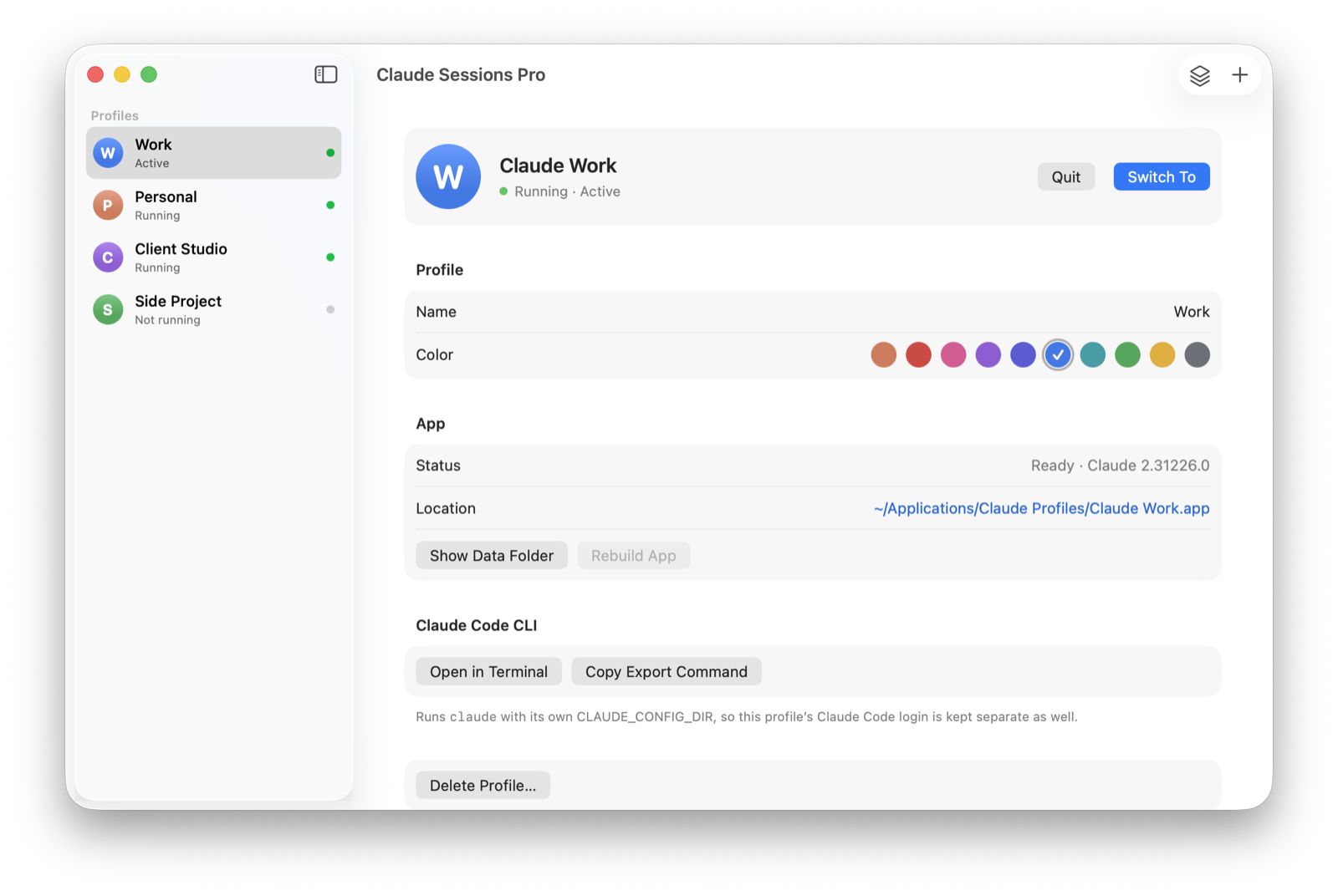
Claude Sessions Pro turns each Claude account into its own app on a Mac, with its own Dock icon, colored badge and place in Cmd-Tab, plus a menu bar switcher. On Windows each account opens in its own Claude window, titled with its name. They're all signed in and open at the same time, so there's nothing to switch.
Every profile keeps its own login, chats, projects, Code tab sessions, pins, settings and connectors, and Google sign-in comes back to the profile that asked. It starts from the Claude you already use, so your current account becomes your first profile with everything in it. Try it free for an hour; then it's $15 once for two computers, Mac or PC, with a 14-day refund.
| Sign out and in | Free workarounds | Claude Sessions Pro | |
|---|---|---|---|
| All accounts signed in at once | ✕ | ✓ | ✓ |
| Desktop app per account | ✕ | Mac only, by hand | ✓ |
| Tell accounts apart at a glance | ✕ | Shared icon | ✓ Own icon or window title |
| Google sign-in to the right account | ✓ | Often the wrong window | ✓ |
| Claude Code per account | One at a time | CLAUDE_CONFIG_DIR | ✓ Code tab + CLI |
| Cost | Free | Free | $15 one-time |
We make Claude Sessions Pro.
 Claude Sessions Pro
Free 1-hour preview · 14-day refund · 2 computers, Mac or PC
Two people sharing one computer instead? See Claude for multiple users on one computer.
FAQ
Can I stay signed in to two Claude accounts at once?
Yes, as long as each account has its own data folder: a second browser profile on the web, a second CLAUDE_CONFIG_DIR in Claude Code, or a second copy of Claude Desktop with its own folder. One copy of Claude Desktop holds one login.
Do I lose my chats when I switch accounts?
No. Chats are stored in your Claude account, so they're there when you sign back in. What you lose by signing out is time and your place, and you can't see both accounts at once.
Is it allowed to use multiple Claude accounts?
Claude Sessions Pro runs the official Claude app, signed into accounts you own, such as your work and personal Claude accounts. It doesn't change how Claude works. Anthropic's terms still apply to each account; using several accounts to get around usage limits may break them, so use it for accounts you're allowed to have.
What's the best way to stay signed in to several Claude accounts?
If you use the Claude Desktop app, an app per account: you keep the desktop app, its Code tab and connectors for every account, all open at once. Claude Sessions Pro sets that up for you. If you only chat on the web, a browser profile per account is enough.
Claude Sessions Pro is made by LEX GLOBAL IT S.R.L. and is not affiliated with, endorsed by or sponsored by Anthropic. It runs the official Claude app with accounts you already have, and Anthropic's terms apply to each account. Claude is a trademark of Anthropic, PBC.