 Claude Sessions Pro
Short answer: managing several Claude accounts comes down to four things: always knowing which account is in front of you, keeping each account's chats, projects and connectors separate, keeping Claude Code on the same account as the app, and seeing every plan's usage without signing in and out. Claude Desktop gives you none of them, because it holds one login. Claude Sessions Pro is the account manager for it: a named, color-coded Claude app per account, all open at once.
Free 1-hour preview. For macOS 14 or later, 64-bit Windows 10 or 11, or Ubuntu 22.04+ and Debian 12+, with the Claude app installed.
What goes wrong with several accounts
- The wrong account answers. Every Claude window looks the same. You ask a client question in your personal account, or upload company files to the wrong project, and notice afterwards.
- The terminal disagrees. Claude Code keeps its own login. The app can be on your work account while the CLI is still billing your personal plan.
- Nobody knows what is left. Each account has its own limits, and Claude shows only the one you are signed in to.
A system that holds up
- Name each account by what it is for. "Work", "Personal", "Client: Acme". A purpose is easier to keep straight than an email address.
- Give each one its own place. Its own app, its own color, its own spot in the Dock or taskbar, so the account is obvious before you type.
- Set up connectors where they belong. Connect work tools in the work account and your own in yours. Connectors and MCP servers stay with the account and app you added them in.
- Keep Claude Code on the matching account.
Give each account its own config folder, or open the CLI from the account's own app.
/statusshows which login is in use. - Watch usage per account. Know which account has room before you start a long task, not after it stops.
The account manager Claude doesn't have.
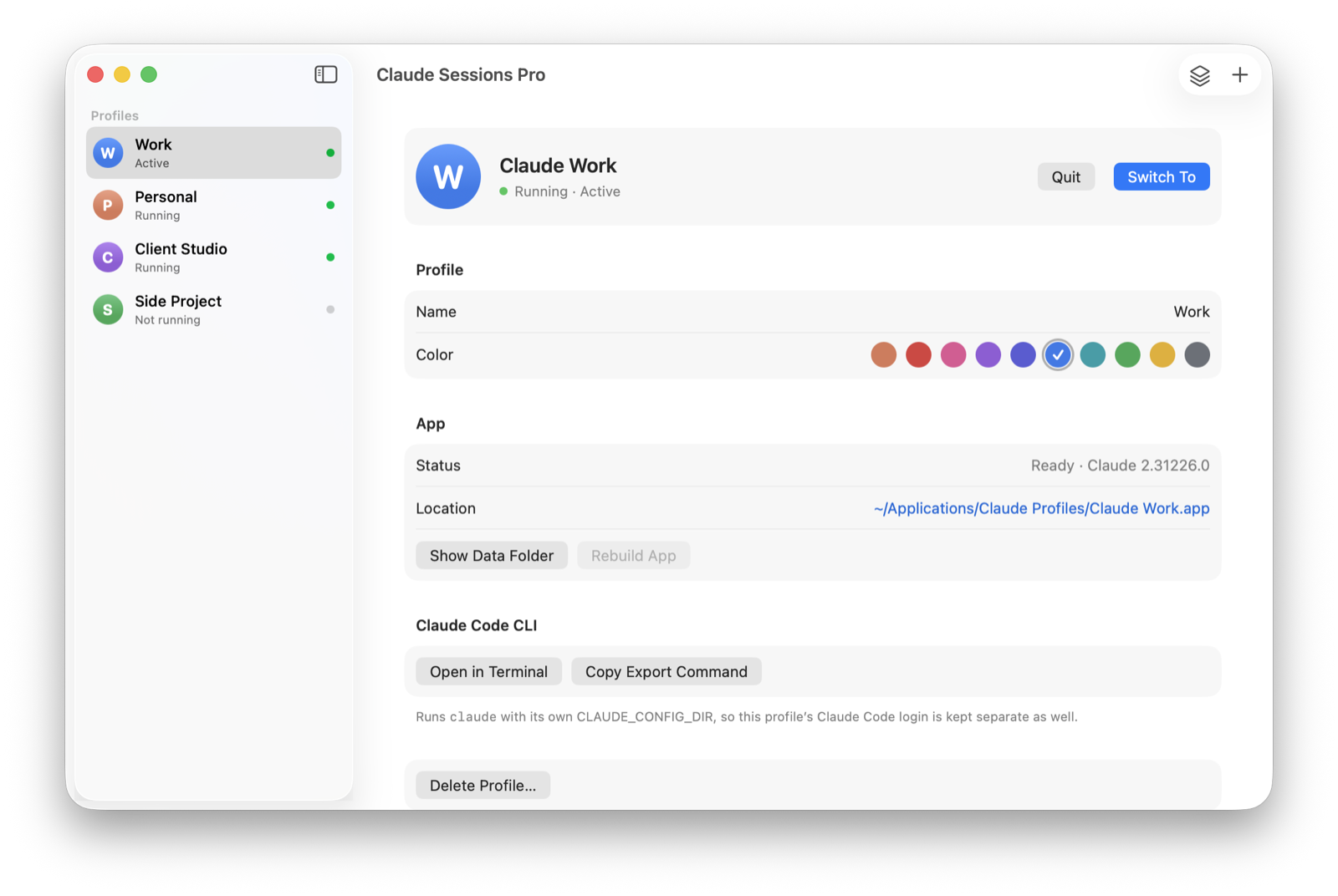
Claude Sessions Pro turns that system into an app. Make a profile for each account, name it and pick a color, and it opens as its own Claude app: its own Dock icon with a colored badge on a Mac, its own titled window on Windows and Linux. All of them stay signed in and open together.
One window lists every profile. A menu in the menu bar or tray switches between them and shows each account's session and weekly usage, with alerts at 80% and 95%. Each profile keeps its own chats, Code tab sessions, settings and connectors, and "Claude Code in Terminal" opens the CLI on that profile's account. Try it free for an hour; then it's $15 once for two computers, Mac, PC or Linux, with a 14-day refund.
| By hand | Claude Sessions Pro | |
|---|---|---|
| Telling accounts apart | Check the account menu each time | ✓ Name, color and icon |
| Changing account | Sign out and in | ✓ Click its window |
| Accounts open at once | ✕ One in Claude Desktop | ✓ All of them |
| Claude Code on the right account | A folder to remember per account | ✓ Opens from the profile |
| Usage for every account | ✕ One at a time | ✓ One menu |
| Cost | Free | $15 one-time |
Example accounts. We make Claude Sessions Pro.
Who this is for
- Employees with a Team seat and their own plan. Two accounts, two purposes, both open.
- Freelancers and agencies. One profile per client, so no client's work shows up in another's account.
- Households. Two people on one computer are better off with a computer user each. Claude for multiple users.
Claude Sessions Pro runs the official Claude app, signed into accounts you own, such as your work and personal Claude accounts. It doesn't change how Claude works. Anthropic's terms still apply to each account; using several accounts to get around usage limits may break them, so use it for accounts you're allowed to have.
 Claude Sessions Pro
Free 1-hour preview · 14-day refund · 2 computers, Mac, PC or Linux
FAQ
How do I manage multiple Claude accounts?
Name each account by purpose, give each its own app or window, keep connectors and Claude Code on the matching account, and watch each account's usage. Claude Sessions Pro does all of this for Claude Desktop.
Is there an account manager for Claude?
Claude's account menu switches between a personal and an organization account on the same email, one at a time. Claude Sessions Pro is an account manager for Claude Desktop on Mac, Windows and Linux, with a profile per account.
How do I stop mixing up my work and personal Claude?
Give each account its own app with its own name and color. With Claude Sessions Pro, "Work" and "Personal" are separate apps, so you see which one you are in before you type.
How do I manage multiple Claude Code accounts?
Give each account its own CLAUDE_CONFIG_DIR, as Anthropic's docs describe, or open Claude Code from each Claude Sessions Pro profile, which does that for you.
Can I see usage for all my Claude accounts at once?
Yes, with Claude Sessions Pro: each account's session and weekly usage is in the menu bar on a Mac or the tray on Windows.
Claude Sessions Pro is made by LEX GLOBAL IT S.R.L. and is not affiliated with, endorsed by or sponsored by Anthropic. It runs the official Claude app with accounts you already have, and Anthropic's terms apply to each account. Claude is a trademark of Anthropic, PBC.